
By TACP Staff on July 18, 2021
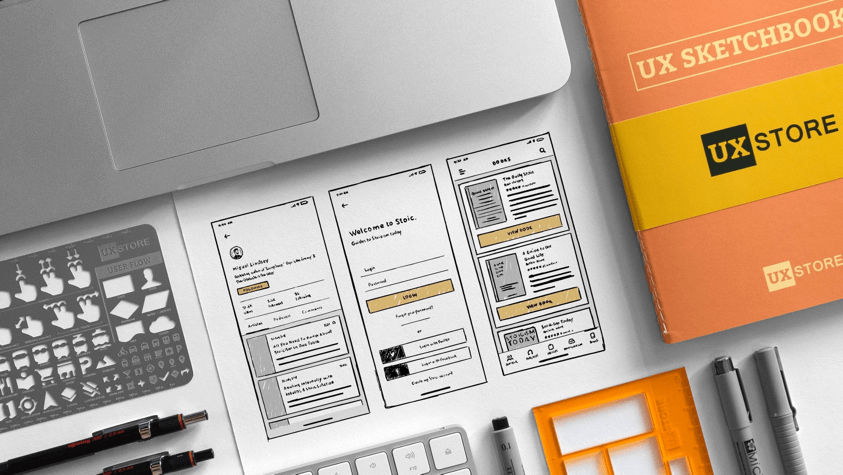
Essential to a career as a successful UI/UX Designer is an integrated and balanced comprehension of animation, design, and multimedia art. Artists involved with user interface (UI) work with game platforms and applications; those with jobs in user experience (UX) maximize a product’s full potential for user enjoyment. Both roles are vital.
There is some confusion and misconceptions in the world of UI / UX design about what each professional does on a daily basis, how the two jobs are similar, and how they differ. UX refers to User Experience Design. UI refers to User Interface Design. Both are critical to a product and both work very closely together. However, despite their similarities, the roles of each of these jobs are quite different. Whereas UX design is more analytical and technical, UI design is closer to graphic design (although the job is actually quite a bit more complex).
Because of the digital world of tablets, smartphones, smart tv’s, interactive screens, gaming, and the like, the definition of design has evolved. Graphic designers decide how things look, which can be online (mobile apps and websites) or printed (magazines and brochures). But, in graphic design, it’s not so much about the medium as the fact it is static and non-interactive. In contrast, UI design pertains to the design of ‘interactive’ elements in digital media, like tablets, smartphones, and computers. These interactive elements include icons, clickable items, animations, drop down menus, form fields, buttons, etc. On the other hand, UX design focuses on the structure behind all the elements a user interacts with, or how a button or icon should perform when you click on it. Think of it this way; riding a wave: UI is the surfboard and ankle strap, while UX is the feeling you have as you effortlessly glide through the water.
Although some designers focus on both UI and UX design, most often these tasks are carried out by a team, or one or two individuals. That said, a good UI designer must also understand UX design.
Because both UX and UI designers rely on computers for completing various tasks, most designers work in offices or studios. During any given day, they may attend meetings with other creative individuals, management, and supervisors to ensure work is going as expected and on deadline. Like web developers, computer systems design and related service companies are the largest employers of UX and UI designers.
UX designers are all about creating compelling and satisfying experiences for users of a product. They need to possess strong creative and technical skills. To perform their job, they consult with clients to understand their goals and objectives. They conduct usability testing, develop usage scenarios and personas, assist with content development, create wireframes, sitemaps, storyboards, and screen flows. They research and analyze user feedback and activity to enhance user experience, and create product prototypes. They are expected to be collaborative, but also self-directed. Must have great communication skills, time management and an attention to details. Keen organizational and problem-solving skills ae also vital, as are creativity and passion for the field.
On the other hand, the main job of an UI designer is to write computer code that results in an easy-to-use product. These interfaces may include web forms, database front ends, invoices and more. UI designers may work with one application, which is typical for larger companies, or they may work on the implementation of many various forms across operating systems. Depending on the platform, they may use HTML, CSS, Javascript, Java, PHP, Flash, Ruby on Rails, etc. In smaller companies, UI designers may work on the entire process, from refining mockups to defining user flows. In larger companies, they will likely specialize in sketching or wireframing, or strategizing the layout of a site or app.
The best way to learn a new language is to immerse yourself in the culture. In the same way, the best way to learn UX or UI design is to immerse yourself in a formal education. UX and UI designers are usually required to hold a bachelor’s degree, although associate degree and certificate programs can also lead to entry-level employment. Students can choose from a wide-range of different degree programs, including communication, computer science, visual design, graphic design, web development, software engineering, or even psychology. But, as in most creative and artistic fields, a strong portfolio is key to obtaining employment.
Areas of focus for a degree in UX design specifically may include visual design and development, information architecture, content, controls, user research customer and technical support and branding. Coursework will include various classes in programming, web media, introduction to Adobe Creative Cloud, Fireworks, InVison, and Dreamweaver software, search engine optimization (SEO) and marketing, graphic design, user experience (UX) metrics, HTML and CSS, Java, and more. They must have a solid understanding of wireframing tools like Balsamiq and Axure RP. They must also be able to adapt to new and ever-changing technologies to keep their skills sharp and industry knowledge current.
Areas of focus for an UI designer will include front-end web development, human-computer interaction, interactive media design, mobile development, graphic design and usability testing. Programming skills are especially marketable, and employers want to know graduates have completed classes in HTML, CSS, AJAX, JSON, jQuery, SQL database development, Photoshop, Flash, Javascript, Flex, and Illustrator.
Most bachelor’s programs overlap and require students to take many of the same courses to graduate, and there are many designers who, upon graduation, can do all aspects of the design process. But, those who choose to specialize as either a UX designer or UI designer might be wise to explore specific classes that are more geared toward one field or the other.
The US Bureau of Labor Statistics reports that the median annual salary for software developers (the field UI Designers falls under) was $103,560 in May 2017. For those just starting out, or for individuals who may hold an associate degree, certificate or have little experience in the field; the annual salary was about $57,000 per year. Those with experience and a bachelor’s or master’s degree made about $154,000 per year. The industries that employ the most software developers include computer systems design and related services, software publishers, finance and insurance, computer and electronic product manufacturing and management of companies and enterprises, in that order.
Most UI designers work full-time in an office or studio. Both large and small companies hire UI designers, and the job outlook is good. In fact, employment is expected to grow 17 percent from 2014 to 2024, which is much faster than average for all career fields. This is due in part because of the need for new apps on mobile devices and tablets, and an increase in the number of products that use software, such as cell phones, smart tv’s and appliances.
Although the US Bureau of Labor Statistics does not report information specific to UX or UI design, it does report information for web development (web programmers, web designers, and webmasters) which loosely covers UX design. The BLS reports the median annual salary for web developers was $67,990 in May 2017. Again, those with little experience earn less than $34,000 per year, but those with experience and a degree in-hand can earn more than $116,000 per year. Job growth opportunities are expected to increase by 27 percent between 2014 and 2024, which is much faster than average for all career fields.
Some UX and UI designers work freelance as self-employed contract workers. Just as job offers may be intermittent, so is pay, so those who choose this path must have a stellar portfolio (which is constantly updated with current work), a large list of contacts, affiliations with clubs, associations, and organizations for networking, talent, and persistence.
Consider these additional careers in Digital Arts.
The Art Career Project is a trusted resource for emerging and professional artists.